
Service overview
- A file transfer and sharing service optimized for confidential data.
- File encryption (E2EE), as standard, that third parties cannot decrypt even after unauthorized access to the cloud.
- Downloads are limited to the recipient's registered device, addressing the risks of misdirected sends and leaked links.
- File transfer is free for basic use; file sharing and some security features are pay-as-you-go, with no monthly fee.
Key features
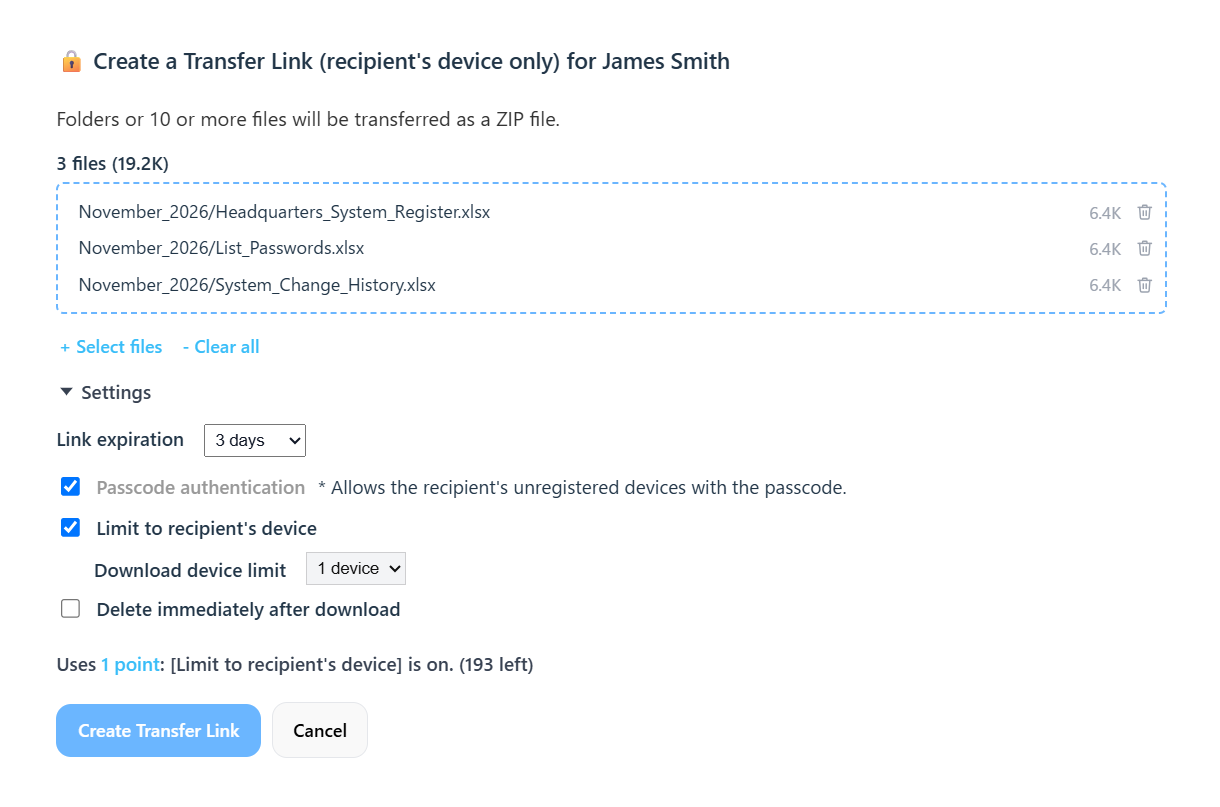
The [Limit to recipient's device] option can limit downloads to a single device of the recipient.
Downloads are limited to once per device, and you can set a limit on the number of devices.
If device registration is lost, for example because browser data was cleared, the recipient can reconnect by entering the passcode.
Send a Device Registration Link first to register the recipient's device before any file transfer; device binding then blocks third parties.
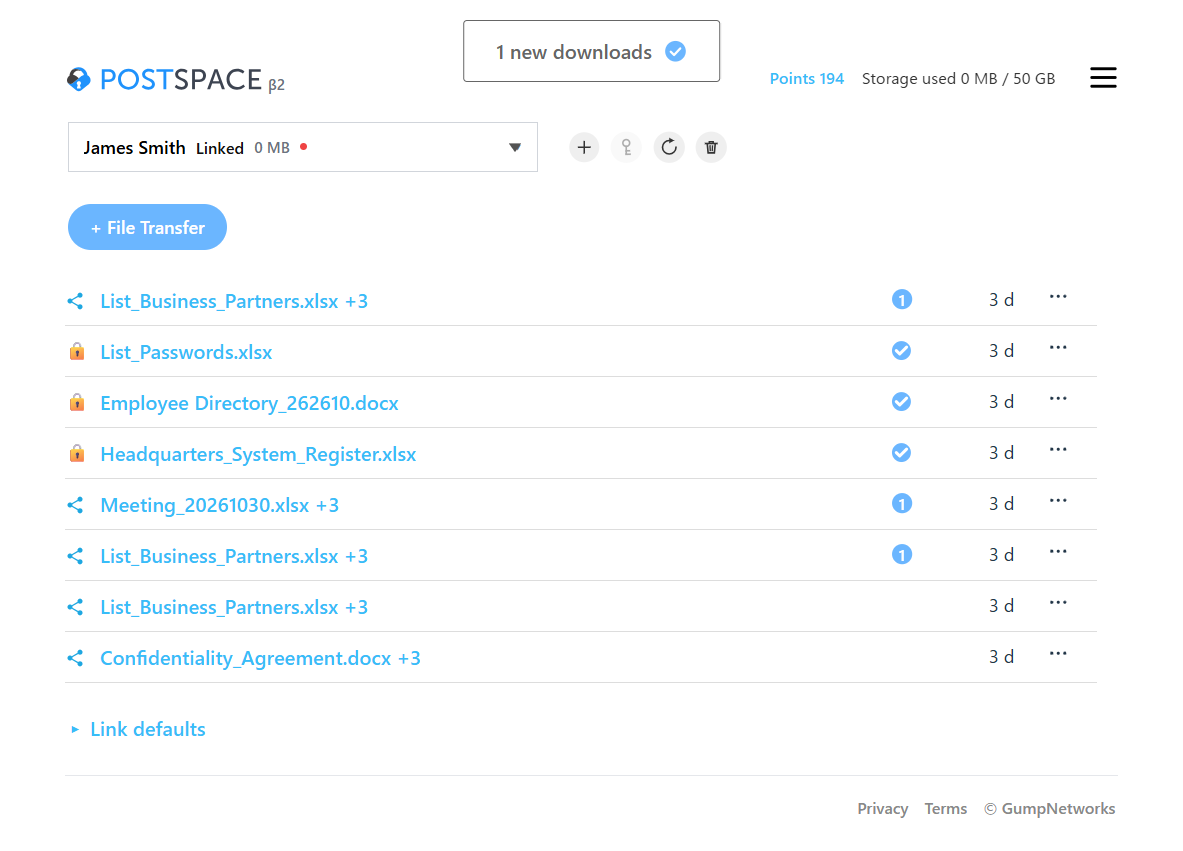
Check in the history list when the other party has finished downloading (or uploading, for Upload Links).
An optional setting can automatically delete files when the download completes.
Cancel instantly, per link or per recipient.
View each recipient's status (connection state and new activity) in a list.
View your transfer history for at least 30 days after a link is created.
Use cases
- Credential exchange
IDs, passwords, identity verification information, etc. - Personal data exchange
HR data, customer data, medical data, and national ID numbers such as SSNs - Confidential information exchange
Financial data, design documents, contracts, proposals, etc.
How it works (sending files for the first time)
- Register as a user.
- Upload files and create the first Transfer Link.
- If needed, enable [Passcode authentication] or [Limit to recipient's device] on the link creation screen.*If you are sending highly confidential files, we recommend enabling [Passcode authentication].*To transfer to multiple recipients, do not enable [Limit to recipient's device]; limit the number of devices with [Download device limit] instead.
- Send the Transfer Link to the recipient using your usual email or another method.
- If you enabled [Passcode authentication], share the automatically generated 8-character passcode with the recipient.*We recommend sharing the passcode through a channel separate from the link, such as a phone call or a messaging app.
- If you enable [Limit to recipient's device], only the device that connects first can connect to the link. From the next time on, files can be transferred safely without a passcode.*The passcode is required again in cases such as when the recipient goes 30 days without use or clears their browser data.
Screen image
Service Specs
- File transfer
Create a Transfer Link with [Limit to recipient's device] enabled, and files can be transferred only to the device the recipient registered when connecting. - File sharing
Create a Shared Link, and once the recipients register their devices, you can share files repeatedly through the same link, only with the registered devices. - Receiving files
Create an Upload Link to receive files from a specific person. - Points
The following require 1 point per link (for Shared Links, per file addition):- Some optional file transfer features (such as enabling [Limit to recipient's device] and transfers over 1 GB in total per link)
- Creating Upload Links (the recipient's uploads are included)
- Adding files to Shared Links
*Sending multiple files through 1 link (for Shared Links, 1 file addition) still uses 1 point.*If a link is deleted or reaches its expiration before the recipient uses it, the point is returned.
| Item | Free tier | With points |
|---|---|---|
| File size (per link) | 1 GB | 10 GB |
| Number of files (per link) | 500 | 10,000 |
| Download device limit | 5 devices | 30 devices |
| Transfer Link expiration | 12 hours to 3 days | 12 hours to 7 days |
| Upload Links | - | Creating links |
| Shared Links | Creating and deleting links Adding devices Deleting files | Adding files |
| Storage | 1 GB | 50 GB |
| Registered recipients | 30 | 30 |
*Upload Links are valid for 12 hours to 7 days (up to 3 days for the first one).*Shared Links are valid for 12 hours to 3 days until the recipient connects, then for 30 days from the latest connection (up to 90 days from creation).*Files shared through a Shared Link are valid for 12 hours to 7 days.
Pricing
- Basic file transfer features are free.
- When you use a feature that requires points, 1 point is used per link (for Shared Links, per file addition).
- 5 points are granted when you register.
- You can purchase more points whenever you need them. There is no monthly fee.
| 10 points | $3.67 ($0.37 per point) |
|---|---|
| 100 points | $18.33 ($0.18 per point) |
| 500 points | $36.67 ($0.07 per point) |
*Prices are in US dollars and are the total amount you pay.*Points do not expire, but they are forfeited if you do not log in for 5 years.*Purchases are non-refundable.
Privacy-first design
- End-to-end encryption is built in as standard, so neither the service operator nor cloud providers can view the contents of data stored in the cloud.
- When you delete a link (or, for a Shared Link, a file), the files are deleted from the cloud immediately and no longer appear in your history.
- Connection logs and metadata are kept to the minimum necessary, in a design that balances security and privacy.
Technical explanation
- Zero-knowledge end-to-end encryption (E2EE)
No one other than the sender and the recipient, including the service operator, can decrypt the encrypted files stored in the cloud. Even if the cloud is compromised through a cyberattack, human error, or insider misconduct, the risk of information leakage is greatly reduced. - Device binding control
The device that connects through the first Transfer Link (or a Device Registration Link) is registered, and connections from any other device are blocked after that. This also addresses risks that conventional end-to-end encrypted file transfer did not cover, such as email misdelivery by the sender, unintended resharing by the recipient, and cyberattacks on email routes. - Dual-key architecture
Unless a malicious attacker obtains both administrative control of the cloud service and administrative control of the device, recovering the encryption keys and the encrypted data is extremely difficult. - AES-256-GCM
An industry-standard encryption algorithm is used, and strong data protection is achieved through the combination of tamper detection and layered replay resistance. - Minimal metadata and access logs
Unencrypted files and the encryption keys usable for decryption are not stored on the server. The server keeps metadata such as the sender name, recipient label, and file name, and access logs such as the IP address, browser information, and date and time.
FAQ
Q. Is it free to use?
A. Yes. Some features, such as device binding, require points, but the points granted at registration (5 points) let you use all features. When you use a feature that requires points, 1 point is used per link (for Shared Links, per file addition). If you have no points, limits apply, such as a maximum transfer of 1 GB.
Q. How do I buy additional points?
A. After you log in, you can buy points whenever you need them, starting from 10 points, from [Points] in the menu. Supported payment methods are credit card, Google Pay, Apple Pay, and Stripe Link. There is no monthly fee.
Q. Are there any ads?
A. No. There are no ads at all. We run the service by selling additional points to users who use the features that require points.
Q. Are points used even if the recipient has not downloaded the files?
A. No. The 1 point used when the link is created is returned if the link is deleted or reaches its expiration without being used by the recipient.
Q. Can external recipients use it?
A. Yes. Even if the other party does not use POSTSPACE, you can share files by forwarding a link by email or another method. Recipients do not need to install an app or create an account.
Q. The recipient cannot download again after downloading from a Transfer Link. What should I do?
A. For security, a Transfer Link without [Limit to recipient's device] enabled can be downloaded only once per device per link. To let the recipient download repeatedly, either create the link with [Limit to recipient's device] enabled on the Transfer Link creation screen, or select the “File Sharing” type when creating the recipient and share the files through a Shared Link.
Q. Does encryption disable malware detection?
A. No. Malware detection remains effective. Encrypted files are automatically decrypted on the recipient’s device, and the operating system and endpoint protection tools (EPP/EDR) scan them for viruses and other threats as usual.
Q. If recipients do not need to register, how is the transfer still secure?
A. With end-to-end encryption, files are encrypted on the device before sending, and encryption keys are never stored on the server. Even if an attacker breaches the cloud, the files cannot be decrypted because the encryption keys are not there. In addition, when device binding is enabled, even if a third party illegitimately obtains the link, the link alone cannot decrypt the files.
Q. Why is end-to-end encryption necessary when TLS/HTTPS (SSL) already exists?
A. TLS encrypts the communication path from the device to the server, and data is decrypted as soon as it reaches the server. Data stored on the server is therefore exposed to leakage risks such as server compromise, misconfiguration, or insider misconduct. End-to-end encryption, by contrast, encrypts and decrypts data only on the devices, so even if the server or cloud storage is compromised, the risk of information leakage is greatly reduced.
Q. How is end-to-end encryption different from ordinary file encryption or storage encryption?
A. With ordinary encryption, the service operator keeps the keys on the server or in the cloud, so if that environment is compromised, the keys can be abused to decrypt the data. End-to-end encryption is designed not to keep keys usable for decryption on the server, so even if the server or cloud is compromised, an attacker cannot decrypt the data using the stored data alone.
Q. How is POSTSPACE different from other end-to-end encrypted file transfer services?
A. Most conventional end-to-end encryption services stay secure on the assumption that the other party logs in to the same service. To send securely to a recipient who has not signed up for the service, you need to send a password through a separate channel for every transfer. With POSTSPACE, when you enable device binding, you only need to share the passcode the first time. The recipient's device is registered on the first connection, and from then on, even if the link reaches a third party, unauthorized connections are blocked.
Q. If the encryption key on my device is stolen, will information leak right away?
A. No. POSTSPACE issues a separate encryption key for each link and uses a separated key structure such as its dual-key architecture, so the encryption key on the device alone cannot decrypt the files in the cloud. Even if some encryption keys were obtained by a third party, the impact would be limited to the relevant user and link.
Q. If I lose a link or my encryption key, will I be unable to retrieve my files?
A. Links can be restored. Once the sender logs in, links within their validity period can be retrieved from the history at any time. If you lose your encryption key, for example by clearing browser data or replacing your device, you can restore it by entering the Secret Code you saved when you signed up. If you also lose the Secret Code, no one, including the operator, can decrypt the files, so please keep it in a safe place.
Q. What if the device is infected with malware?
A. POSTSPACE alone cannot prevent malware infection on the device. We recommend device-side malware protection and EDR. Even in the event of malware infection, the design helps minimize the spread of damage through key separation, link revocation/disablement, and Secret Code reset.
Q. Do you store credit card information or personal information?
A. POSTSPACE does not store credit card information. It is managed by our payment processor, Stripe, Inc. (USA). The personal information POSTSPACE stores is your email address, sender name, and recipient labels. In addition, to prevent unauthorized access, we store system information such as the connecting IP address, User-Agent, and your password (hashed). If you log in with a Google or Microsoft account, POSTSPACE does not store a password. For details, please see the Privacy Policy.
Q. Where are the servers located?
A. Our main servers, including the application and database servers, are located in data centers in Japan. Files are stored using a cloud service from a provider based outside Japan (R2 from Cloudflare, Inc. of the United States). The locations of its data centers are not publicly disclosed, but end-to-end encryption prevents the provider from viewing the contents of the files.